The Goal
The TV in my living room is an LG OLED65C5: 4K at 120 Hz, VRR, ALLM. The gaming PC that
drives it is the one from the Linux Multi-Seat Gaming series -
a Radeon RX 9070 XT running Steam Big Picture in a dedicated gamescope session, started and
stopped as a systemd user unit (Part 3 is where
that design settled, seats and all). The session script has asked for
-r 120 --adaptive-sync since Part 1. The TV had been quietly giving me 4K60 with no
variable refresh the whole time.
What I actually wanted was VRR. 120 Hz was a bonus. This note is about the DisplayPort to HDMI adapter that got me both, the HDMI matrix that stopped passing a picture the moment it was plugged in, and the rebuild of my HyperHDR ambient lighting that followed - which ended with me writing a small Rust daemon.
Why HDMI 2.1 is awkward on Linux
In 2024 the HDMI Forum rejected AMD’s open-source HDMI 2.1 implementation. Everything above HDMI 2.0 bandwidth needs Fixed Rate Link (FRL) signalling, and amdgpu was not allowed to implement it, so the open driver drove HDMI with TMDS only: 4K60 8-bit, no 120 Hz, no HDMI-Forum VRR.
That changed during 2026. FRL patches developed by AMD together with Valve started landing on the mailing list in May (GamingOnLinux), and the state of play right now is:
- FRL itself merged for Linux 7.2, but
disabled by default, behind
the
DC_FRL_MASKbit of theamdgpu.dcfeaturemaskmodule parameter (0x400). AMD kept it off deliberately: FRL without working VRR would have been a regression for people with FRL-capable displays. - DSC, VRR and ALLM came after, in the following cycles.
- Linux 7.4 turns FRL on by default and repurposes the mask bit as an opt-out (Phoronix). The patch is by Fangzhi Zuo at AMD.
I am on 7.2.2 (CachyOS), and amdgpu.dcfeaturemask=0x402 has been on my kernel command line
for a while. I never got 120 Hz out of the card’s native HDMI port with it.
That is not evidence that native FRL is broken on 7.2, and the post would be lying if it
implied otherwise. My HDMI cable ran through an HDMI 2.0 matrix the entire time (more on
that below), so FRL could not have negotiated end to end no matter what the driver did. I
never tested the native HDMI port straight into the TV. If you are on 7.2 or 7.3 with a
direct cable, try amdgpu.dcfeaturemask=0x400 before buying anything.
The other route does not depend on any of this. Let the GPU speak DisplayPort, which has had the bandwidth all along, and put a protocol converter (a PCON) at the far end to turn it into HDMI 2.1. The FRL happens inside the adapter, where the HDMI Forum’s licensing position is somebody else’s problem, and amdgpu has understood DP-to-HDMI converters for years.
The adapter: Ugreen 85564 (Chrontel CH7218)
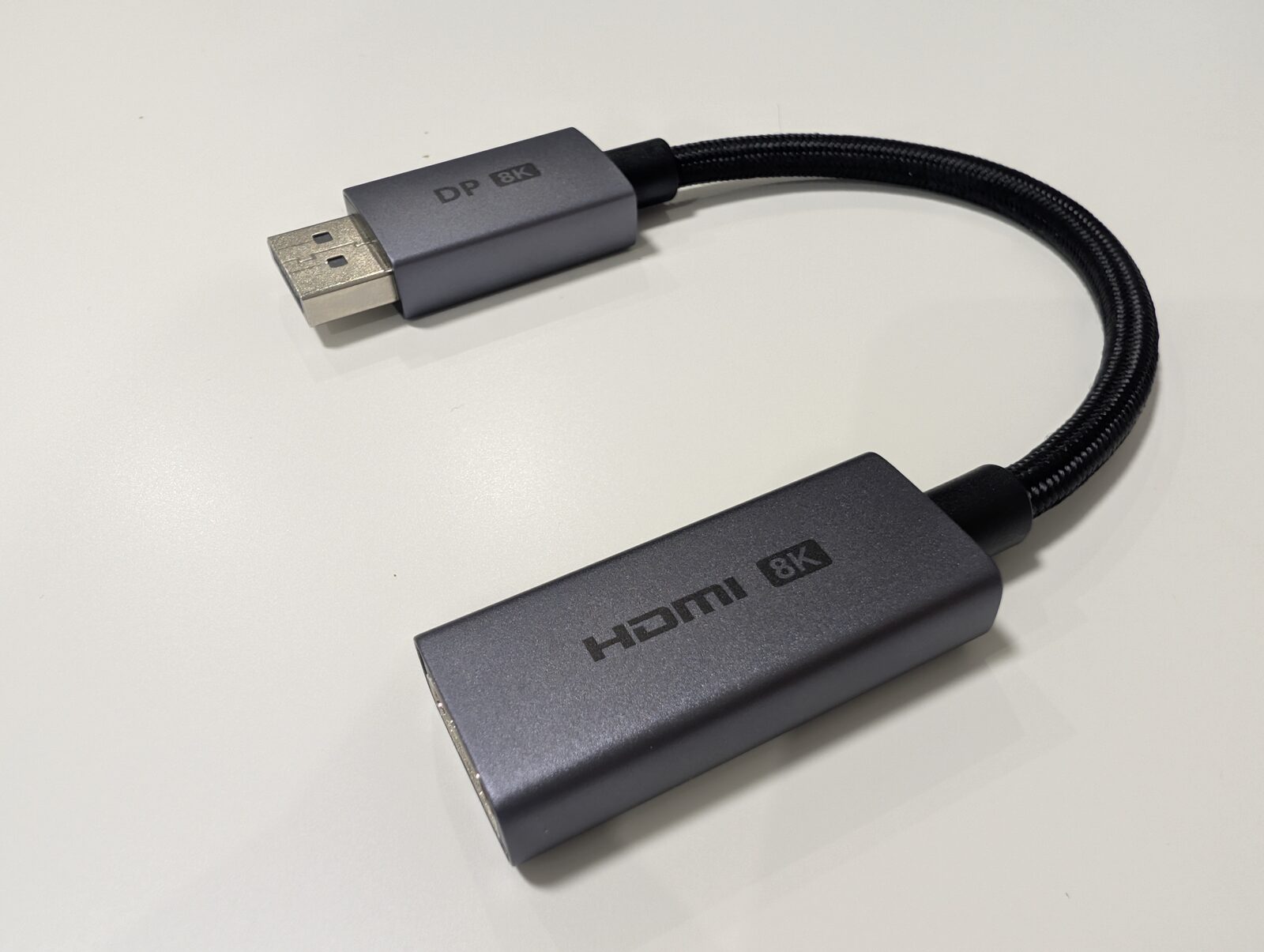 The Ugreen 85564: DisplayPort male on one end, HDMI female on the other, Chrontel CH7218 inside.
I picked this one on a recommendation from a chat. The most detailed case for it that I can point at is Tomasz Pakuła’s, who has done most of the recent legwork on PCONs for amdgpu. His summary: the CH7218 is the only chip on the market doing 4K144, 10-bit 4:4:4 and stable FreeSync VRR out of the box with no custom firmware flashing, and it behaves better than the Synaptics VMM7100 that Linux already knew about - more stable VRR, more reliable HDR switching, and HDMI CEC tunnelling.
About the word “whitelisted”
I repeated to myself, and nearly wrote here, that this chip is “whitelisted in amdgpu”. That is half true at best, and the accurate version is more interesting.
amdgpu does keep a whitelist of DP-to-HDMI converters, in
drivers/gpu/drm/amd/display/amdgpu_dm/amdgpu_dm_helpers.c:
STATIC_IFN_KUNIT const uint32_t dm_freesync_pcon_whitelist[] = {
	DP_BRANCH_DEVICE_ID_0060AD,
	DP_BRANCH_DEVICE_ID_00E04C,
	DP_BRANCH_DEVICE_ID_90CC24,
	DP_BRANCH_DEVICE_ID_001CF8,
	DP_BRANCH_DEVICE_ID_001FF2,
};
Pakuła posted
a patch adding the CH7218
(DP_BRANCH_DEVICE_ID_2B02F0) in December 2025, with the note that the chip “works
perfectly with VRR after testing” on an RX 9070 XT - the same GPU I have. That patch has
not landed. The list above is from mainline today, and the same five IDs are in the v7.2
tag I am running. There is no 2B02F0 in ddc_service_types.h either.
My adapter is definitely the chip in question. The branch device ID sits at DPCD offset
0x500 and can be read straight off the AUX channel for the connector (DP-1 here is
drm_dp_aux0, per /sys/class/drm/card1-DP-1/):
$ sudo dd if=/dev/drm_dp_aux0 bs=1 skip=$((0x500)) count=16 2>/dev/null | xxd
00000000: 2b02 f043 4837 3231 3844 7036 0030 0000  +..CH7218Dp6.0..
2b 02 f0 is the OUI the patch wants added, and the six bytes after it spell the device ID
string the vendor put there: CH7218.
And yet VRR works here. The connector says so:
$ modetest -M amdgpu -c
...
449	448	connected	DP-1
...
	453 vrr_capable:
		flags: immutable range
		values: 0 1
		value: 1
So the whitelist is not what makes VRR work on this adapter. Reading
amdgpu_dm_update_freesync_caps(), there are three independent paths that can set
freesync_capable, and the whitelist is only the third: the DisplayPort path (the sink
allows invalid MSA timing and the EDID carries a refresh-rate range wider than 10 Hz) and
the HDMI path (an AMD FreeSync VSDB in the EDID) both set it on their own. One of those two
is what fires here; I have not instrumented the driver to find out which.
What the missing whitelist entry costs is the FREESYNC_TYPE_PCON_IN_WHITELIST branch,
which is what makes amdgpu build and send an adaptive-sync infopacket
(mod_build_adaptive_sync_infopacket) through the converter. So there is a more explicit
signalling path I am not getting. Whatever I am getting instead is good enough that the TV
reports a varying refresh rate during games.
Take that as a correction to the shorthand that circulates in chats, mine included: the CH7218 is proposed for the amdgpu whitelist, not in it.
The black screen: FRL will not pass through a TMDS matrix
I plugged the adapter into the DisplayPort output on the RX 9070 XT, ran its HDMI end into the same cable that used to come from the card’s HDMI port, and got nothing. No picture at all, where a second earlier there had been a working 4K60 desktop.
The cable did not go straight to the TV. It went into an EZCOO EZ-MX42HAS-ARC 4×2 HDMI matrix, which is how my ambient lighting gets a copy of whatever is on screen: OUT1 to the TV, OUT2 mirrored into a capture card for HyperHDR.
That matrix is an HDMI 2.0 device. It passes TMDS and nothing else. This had never been a problem, because Linux could not produce anything but TMDS anyway - the driver’s limitation and the matrix’s limitation were the same limitation, so the matrix looked innocent.
Put an FRL-capable source on one side and an FRL-capable TV on the other and they negotiate FRL through the EDID they can see, the matrix gets a signal it cannot regenerate, and the screen stays black. In my case the failure was all or nothing - nothing fell back to TMDS, nothing showed a degraded picture, the TV simply reported no signal.
The fix was to stop running the PC through the matrix at all and plug the adapter’s HDMI straight into the TV.
What the new topology costs
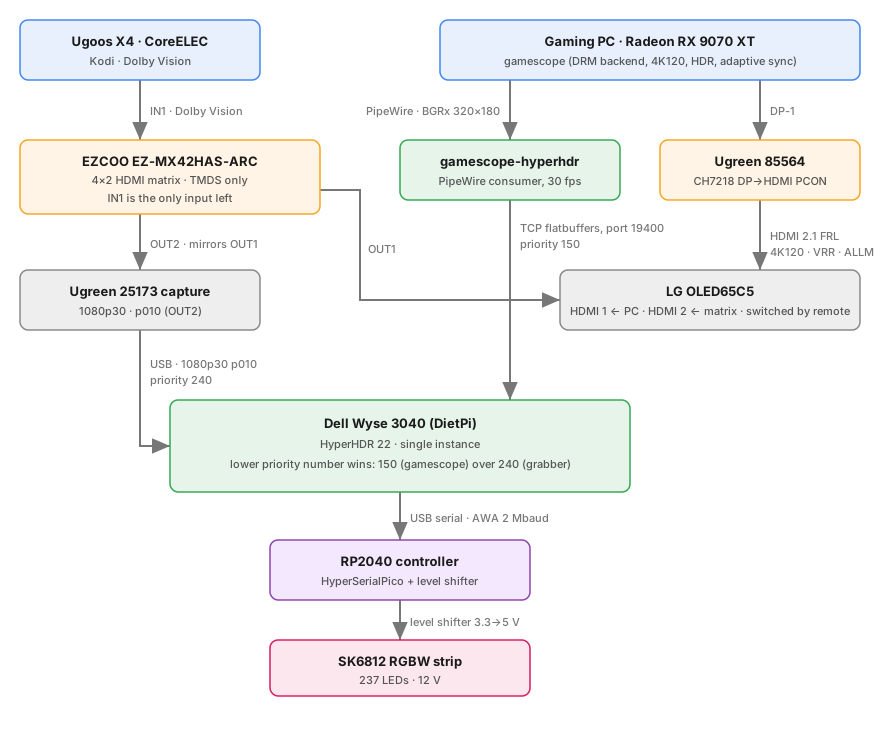
The matrix now has exactly one source left on it, the Ugoos X4 running CoreELEC, and it still mirrors that into the capture card. The PC reaches the TV on its own HDMI input, and the picture it sends is invisible to the capture path. Several things followed from that:
Source switching moved to the TV remote. It used to be a dropdown in Home Assistant
driving ezcoo-usb-control over
USB serial. Now picking between the PC and Kodi means picking an HDMI input on the TV. I had
listed the missing physical control as an open item in the previous note; reaching for the
remote I am already holding turns out to be the better answer.
--prefer-output HDMI-A-1 has to go. The gamescope session script in
Part 2 pinned the output by connector name. The TV
now hangs off DP-1, so that flag either needs updating or removing. I removed it: card1
has exactly one connected output, and gamescope picks it.
The audio sink changed. The same script exports
PULSE_SINK="alsa_output.pci-0000_03_00.1.hdmi-stereo-extra3", the sink for the card’s HDMI
port. Sound now travels over DisplayPort into the adapter, and the right sink is
alsa_output.pci-0000_03_00.1.hdmi-stereo. Find yours with pactl list sinks short.
Renaming it is only half the job, though.
One Home Assistant automation became obsolete. Sync HyperHDR HDR Tone Mapping with EZCOO input forced HyperHDR’s tone mapping on whenever the matrix switched to IN2, because IN2 was the gaming PC and that machine is always in HDR. IN2 has no source on it any more, so that half of the automation never fires, and nothing needs to take its place: the replacement capture path hands HyperHDR SDR frames, as covered under the HyperHDR settings below.
Making the audio sink exist before gamescope needs it
Pointing PULSE_SINK at the right name is not enough, because most of the time that sink
does not exist. The card’s profiles look like this with the TV session stopped:
$ pactl list cards
	Profiles:
		off: Off (sinks: 0, sources: 0, priority: 0, available: yes)
		output:hdmi-stereo: Digital Stereo (HDMI) Output (sinks: 1, sources: 0, priority: 5900, available: no)
		...
	Active Profile: off
Every HDMI profile is available: no, and the card sits at off. Availability comes from
the ELD the HDA codec reads off the connected display:
$ cat /proc/asound/card1/eld#0.0
monitor_present		0
eld_valid		0
No lit display, no ELD, no availability. And the connector is only lit while the gamescope session is running, because that is what takes DRM master on the dGPU.
WirePlumber will not resolve this on its own, and it is worth knowing why before you spend an evening writing rules for it. Profile selection in WirePlumber 0.5 runs through three hooks - restore the stored profile, apply a configured preference, pick the best one - and all three carry the same guard:
if profile.name == profile_name and profile.available ~= "no" and ...
A profile marked unavailable is never selected, no matter how explicitly you have asked for
it. That is why choosing it by hand in pavucontrol works and then does not survive a
reboot: the choice is stored, and the restore hook declines to apply it.
An explicit profile request from pactl does not go through those hooks, so it works even
with nothing plugged in. Asserting it as the session starts is enough:
# ~/.config/systemd/user/gamescope-tv.service.d/hdmi-audio.conf
[Service]
ExecStartPre=-/usr/bin/pactl set-card-profile alsa_card.pci-0000_03_00.1 output:hdmi-stereo
ExecStartPre puts the sink in place before gamescope reads PULSE_SINK, so there is no
race to lose and no sleep to tune. The leading - makes systemd ignore a failure here: if
the audio card is missing or PipeWire is having a bad day, the TV session should still come
up without sound rather than not come up at all.
Which profile is the right one depends on which physical connector you use - the card
exposes four, and the one feeding the TV was hdmi-stereo-extra3 back when the cable was in
the HDMI port. Check with pactl list cards while the session is running and the picture is
on screen.
Confirming the link
gamescope now gets the mode it has been asking for since Part 1:
$ journalctl --user -u gamescope-tv | grep 'selecting mode'
gamescope-steam-session[2296198]: [gamescope] [Info]  drm: selecting mode 3840x2160@120Hz
And the modes the connector offers are HDMI 2.1 territory - 1188000 kHz of pixel clock is about 1.19 GHz, far past the 600 MHz TMDS ceiling:
$ modetest -M amdgpu -c
  #0 3840x2160 60.00  ... 594000 flags: phsync, pvsync; type: preferred, driver
  #1 4096x2160 120.00 ... 1188000 flags: phsync, pvsync; type: driver
  #12 3840x2160 120.00 ... 1188000 flags: phsync, pvsync; type: driver
HDR still works, and the LG puts itself into Game Optimizer when the session comes up without me pressing anything, which is what ALLM is supposed to do. I have not found a way to prove that it is ALLM doing it rather than the TV remembering a per-input preference, so take that one as an observation rather than a measurement. The Game Optimizer panel shows the refresh rate moving around during play, which is the VRR confirmation I have.
One thing I have not checked: whether the DisplayPort link is using DSC to carry this. The RX 9070 XT has DP 2.1 and plenty of raw bandwidth, so it may well not need to. If you are on an older card with DP 1.4, do not assume the modes above transfer.
Losing the backlight
Ambient lighting stopped at the same moment, and for the obvious reason: HyperHDR only ever saw the gaming PC because the matrix mirrored it into the capture card. Kodi on the Ugoos still lights the wall. Games do not.
The straightforward fix would be an FRL-capable HDMI 2.1 splitter between the adapter and the TV. They exist, they are expensive, and a second protocol converter in the chain is a second thing to blame when the picture does not come up.
The other option is to take the picture from the PC itself, before it goes anywhere near a cable. gamescope can do this: it publishes its composited output as a PipeWire video source. Nothing has to be captured, mirrored or re-encoded, and it works regardless of what is happening on the HDMI side.
First attempt: GStreamer, v4l2loopback, and a second HyperHDR
The first working version was made of parts I already had.
gst-launch-1.0 pipewiresrc target-object=gamescope do-timestamp=true keepalive-time=200 \
  ! videorate ! video/x-raw,framerate=30/1 \
  ! videoscale ! video/x-raw,width=320,height=180 \
  ! videoconvert ! video/x-raw,format=YUY2 \
  ! v4l2sink device=/dev/video10 sync=false
pipewiresrc target-object=gamescope picks gamescope’s node out of the PipeWire graph.
do-timestamp=true stamps buffers on arrival, since gamescope produces frames on vblank
rather than on a clock. keepalive-time=200 keeps the element from stalling when nothing
changes on screen. The videorate, videoscale and videoconvert trio drops 4K120 down to
320×180 at 30 fps in YUY2, which is all an ambilight needs. v4l2sink writes that into
/dev/video10, a v4l2loopback device.
A second HyperHDR instance then ran on the gaming PC, grabbed /dev/video10 as if it
were a capture card, and forwarded the result over the flatbuffers protocol to the real
HyperHDR on the Wyse 3040.
It worked. It was also four moving parts that had to come up in the right order - load the loopback module, start the pipeline, start the local HyperHDR, and only then does the wall light up - with nothing supervising any of it and a whole HyperHDR instance running purely as a protocol adapter. Nothing about it was broken. It was just tedious every single time, and tedium is what eventually gets a thing rewritten.
There was also a real problem hiding in it that I only found when I measured the replacement, and it has to do with the full-size 3840×2160 buffers this pipeline negotiates.
gamescope-hyperhdr
So I wrote gamescope-hyperhdr:
a small Rust daemon, MIT licensed, that replaces all four moving parts with one process.
gamescope ──PipeWire (BGRx, MemFd, requested_size)──▶ gamescope-hyperhdr ──TCP flatbuffers──▶ HyperHDR :19400
Three things make it better than the pipeline it replaces, and only one of them is “it is a single process”.
It asks gamescope to do the scaling. gamescope’s PipeWire producer supports a custom
format key, requested_size, alongside the usual BGRx and NV12 offers. The client declares
the size it wants; gamescope negotiates its output size first, then recomputes the capture
size, marks the mis-sized buffers CORRUPTED and renegotiates. You can watch that happen in
the log, two Format events for one connection:
format: BGRx 3840x2160, expected stride 15360, framerate 0/1, requested_size 320x180 event=1
format: BGRx 320x180, expected stride 1280, framerate 0/1, requested_size 320x180 event=2
receiving frames: 320x180 stride 1280 offset 0 chunk 230400 bytes, sending 320x180
The downscale happens on the GPU inside gamescope. What crosses into the daemon is 230 KB a frame instead of 33 MB. If a gamescope build ignores the extension, the client notices and falls back to downscaling on the CPU.
It speaks flatbuffers directly. No v4l2loopback, no second HyperHDR. The daemon converts BGRx to RGB24 and connects straight to HyperHDR’s flatbuffers server at priority 150. HyperHDR treats the lower number as the higher priority, so this source wins over the USB grabber’s 240 whenever it is sending, and the grabber takes over again when it stops.
It manages its own lifecycle. It connects only while gamescope is actually delivering
frames. When the node disappears it sends Clear, disconnects, and waits for gamescope to
come back. That is what makes the handover between “the PC is on the TV” and “Kodi is on the
TV” automatic instead of a thing I have to remember.
One quirk falls out of how gamescope renders: it only produces a frame for PipeWire on vblank when the focused content actually changed, so a perfectly static screen delivers nothing at all. The daemon resends the last frame every second to keep HyperHDR from timing out. In practice this never shows, because the daemon comes up with the Steam session and Steam’s UI animates from the first second.
The measurements in the repo, taken against a nested headless gamescope running vkcube at
3840×2160, are the clearest argument for the requested_size trick:
| Consumer | Negotiated format | gamescope CPU | consumer CPU |
|---|---|---|---|
gst-launch-1.0 pipewiresrc … videoscale … | BGRx 3840×2160 | 19.9 % | 3.8 % |
gamescope-hyperhdr --size 320x180 | BGRx 320×180 | 0.5 % | 0.3 % |
gamescope-hyperhdr --supersample 2 | BGRx 640×360 | 0.8 % | 2.8 % |
--supersample 2 asks gamescope for double the target size and area-averages it down in the
client. It exists because it was easy to add, not because I found a case that needs it; I
run without it.
Nearly all of that 19.9 % is gamescope handing out full 4K buffers. The same test ran fifteen
connect/disconnect cycles against each consumer: gamescope-hyperhdr survived 15 of 15, and
the old pipeline took gamescope down on the third. That looks like a race in gamescope’s
buffer teardown that large frames make easy to hit. These are synthetic numbers from a nested
compositor, not from the production DRM session.
Running it
The repo ships an Arch PKGBUILD and a systemd user unit. On CachyOS that is:
sudo pacman -S --needed base-devel rust pipewire clang pkgconf
cd contrib && makepkg -si
clang is there for bindgen, which generates the PipeWire bindings. The package builds from
the checkout including uncommitted changes, runs the test suite in check() (unit tests plus
network scenarios against a mock HyperHDR, no PipeWire or gamescope needed), and installs the
binary, the user unit and the example configuration. It does not enable anything.
Configuration is environment variables, all of which are also flags:
# ~/.config/gamescope-hyperhdr/env
GSHDR_HOST=hyperhdr.iot.lviv
That is genuinely the whole configuration on my machine. The defaults - 320×180, 30 fps, priority 150, port 19400, a 1 s keepalive - are the values I would have picked anyway.
I tie the daemon to the gamescope session rather than leaving it running, using the drop-in the package ships:
install -Dm644 /usr/share/doc/gamescope-hyperhdr/gamescope-tv.conf \
    ~/.config/systemd/user/gamescope-hyperhdr.service.d/gamescope-tv.conf
systemctl --user daemon-reload
systemctl --user add-wants gamescope-tv.service gamescope-hyperhdr.service
The drop-in is BindsTo= plus After= on gamescope-tv.service, so the feed starts and
stops with the TV session and never lingers with a dead PipeWire node to chase.
On the HyperHDR side, three settings matter. Enable the flatbuffers server on port 19400.
Add the PC to the network whitelist if it is not on the same /24 as the host, otherwise
HyperHDR closes the connection immediately and logs
has been rejected! It's not whitelisted, access denied. And turn HDR tone mapping off
for the flatbuffers server: gamescope always hands PipeWire an SDR frame at gamma 2.2, even
while the TV is receiving HDR, so tone mapping it a second time washes the LEDs out. That
last point is why the dead Home Assistant automation does not need replacing.
What Works
The chain has been running in daily use since the rebuild. The usual caveat applies - this is HyperHDR 22 beta, a DKMS capture module, DIY LED hardware and a daemon I wrote myself, so read it as “works on my setup” rather than a guarantee.
A session from earlier today, start to finish:
gamescope-hyperhdr[2411078]: INFO gamescope-hyperhdr 0.1.0 starting host=hyperhdr.iot.lviv port=19400 priority=150 origin=gamescope size=320x180 supersample=1 requested_size=320x180 max_fps=30 keepalive_ms=1000
gamescope-hyperhdr[2411078]: INFO found source node 'gamescope' id=56 serial=6655
gamescope-hyperhdr[2411078]: INFO format: BGRx 3840x2160, expected stride 15360, framerate 0/1, requested_size 320x180 event=1
gamescope-hyperhdr[2411078]: INFO format: BGRx 320x180, expected stride 1280, framerate 0/1, requested_size 320x180 event=2
gamescope-hyperhdr[2411078]: INFO receiving frames: 320x180 stride 1280 offset 0 chunk 230400 bytes, sending 320x180
gamescope-hyperhdr[2411078]: INFO hyperhdr: connected peer=10.127.255.182:19400
gamescope-hyperhdr[2411078]: INFO hyperhdr: registered with priority 150
gamescope-hyperhdr[2411078]: INFO hyperhdr: stats for the last 60s: received=6603 sent=1763 keepalive=0 superseded=4840 corrupted=0 bounds_errors=0 reconnects=0 bytes_sent=304787440 error_replies=0 convert_avg=28.173µs convert_max=118.24µs
gamescope-hyperhdr[2411078]: INFO hyperhdr: shutting down: sent Clear, disconnecting priority=150
systemd[2249]: gamescope-hyperhdr.service: Consumed 2.931s CPU time over 8min 13.373s wall clock time, 6.9M memory peak.
Reading the stats line: gamescope delivered 6603 frames in that minute (the game was running at over 100 fps), the daemon sent 1763 of them after the 30 fps ceiling, and dropped the rest as superseded. No corrupted buffers, no reconnects, no keepalives needed because the picture never went static. Converting a frame takes about 28 µs. Over eight minutes it used 2.9 s of CPU and 6.9 MB of RAM, which is close enough to free.
Clear on shutdown is the part I care about most: HyperHDR drops back to the USB grabber
the moment the TV session stops, so switching the TV over to Kodi lights the wall from the
capture card with no intervention.
Audio lands on the TV on its own now. Starting the session writes the card profile through
the ExecStartPre above, PULSE_SINK finds the sink already present, and sound comes out
of the TV without pavucontrol being opened once. WirePlumber puts the card back to off
when the session stops and the connector goes dark, which is fine - the next start asserts
it again.
What Doesn’t
Linux 7.4 may make the adapter unnecessary. With FRL on by default and VRR and ALLM merged, the card’s own HDMI port should reach 4K120 without a converter. The matrix still would not pass FRL, so the topology above would barely change; the adapter would just come out of the chain.
The production path is unmeasured. All the CPU numbers above come from a nested headless gamescope. The real session is a DRM backend at 120 Hz in HDR, and I have no way here to measure the end-to-end latency from a frame appearing on the TV to the LEDs behind it following it.